Edit your ECU maps in the browser
Open a read from your ECU. The tool identifies it, finds the maps and names them where it can, from fuelling and boost to the limiters. Change them as tables, see every change against the original, and save a .bin for your own flashing tool.
Free to use. Open and edit any file. 5 free saves, then £20 a year for unlimited.
Sign up freeSign inSee every feature
Your .bin stays on your computer unless you choose to send it to us. Your account keeps the name, size, ECU type, part numbers and a checksum of files you open (your file history), and a fingerprint of each file you save on the free plan, to count free saves. Exactly what’s stored
I built ecutool to tune my own car, and kept going. Every ECU on the list has been tried on real reads, and the experimental ones say so. If your file doesn’t open the way it should, send it from the tool or email contact@ecutool.dev and I’ll look at it.
Jack, ecutool.dev
Works with
Full Maps found and named
- EDC15P / P+
- EDC15P-6
- EDC15V / VM+
- EDC15C / C2 / C3 / C5 / C7 / C11
- EDC15M
- MSA15 / MSA12
- EDC16
Experimental Works, check the maps
- EDC17
- ME7 / ME7.1 / ME7.5
- MED9.1 / MED9.1.5
- Simos18.1 / 18.10
- Simos PCR2.1
- ME9.2
- MED17 / ME17 / MEVD17, MD1 / MG1
- VAG DQ250 6-speed wet DSG gearbox
Tested on reads from VW, Audi, SEAT, Škoda, BMW, Vauxhall / Opel and Alfa Romeo, and the same ECUs in other makes. DQ250 DSG shift maps and gear ratios too. Anything else opens in the hex editor. Find your ECU
What it does
Find the maps
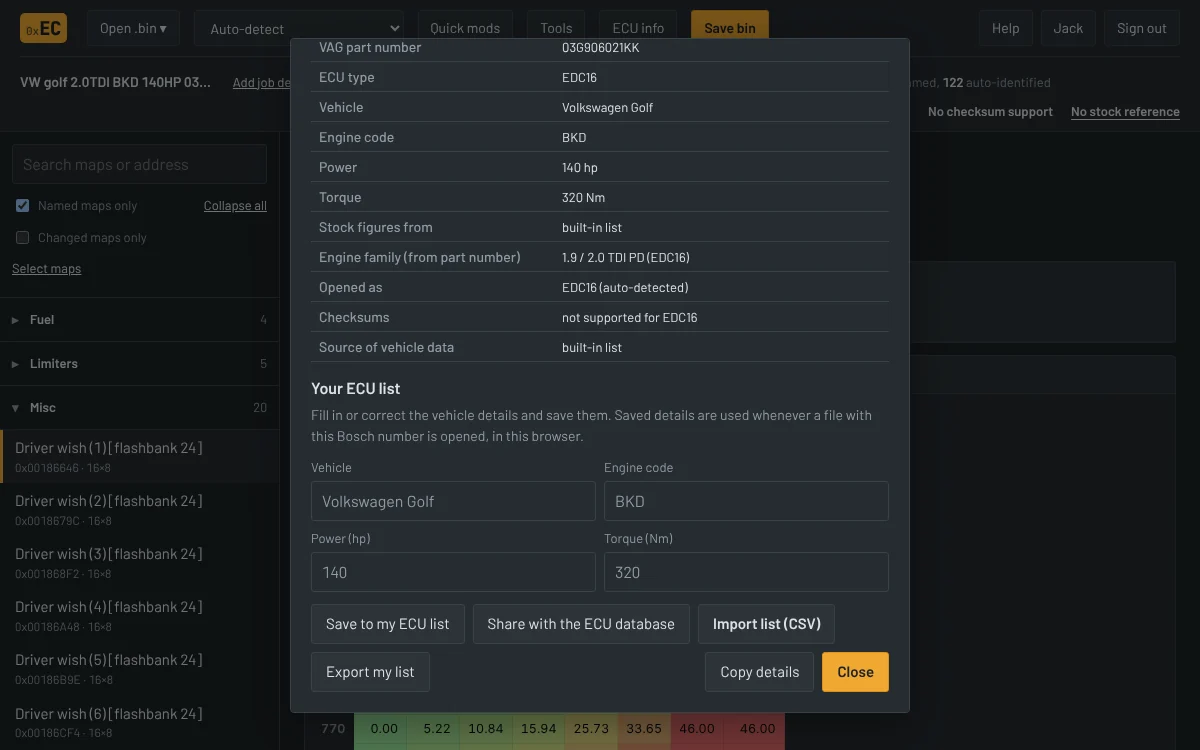
Open a .bin or .ori and the tool reads the Bosch, part and software numbers, then goes looking for the maps. On EDC15 and EDC16 that means the driver’s wish, torque and smoke limiters, boost, SOI and the rev limiter, grouped and named.
- Two-chip reads open as one file
- Stock files recognised by their software number
- Search maps by name or address
Edit
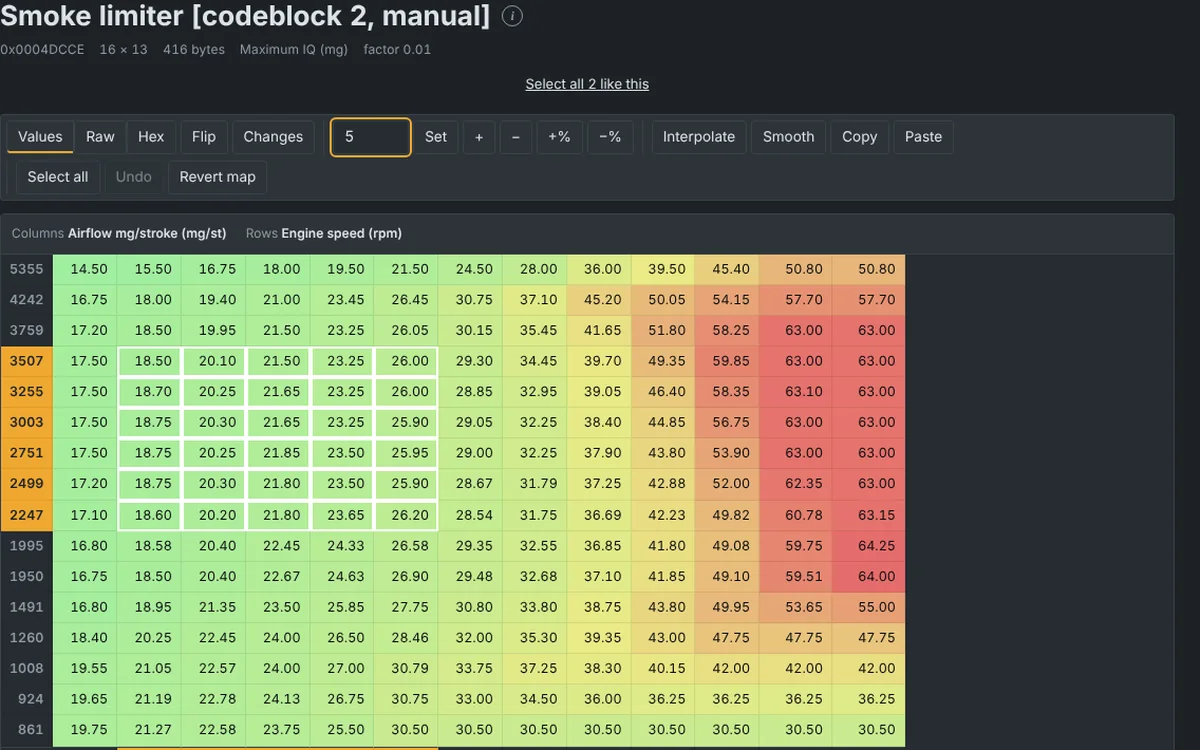
Select cells the way you would in a spreadsheet and set them, add to them or change them by a percentage. Interpolate and smooth a block, copy a map onto another, and undo anything. The 3D graph shows the shape as you go.
- Edit the axes too; every map on that axis follows
- Another map, or the original, beside the one you’re editing
- Undo, redo and keyboard shortcuts
Compare
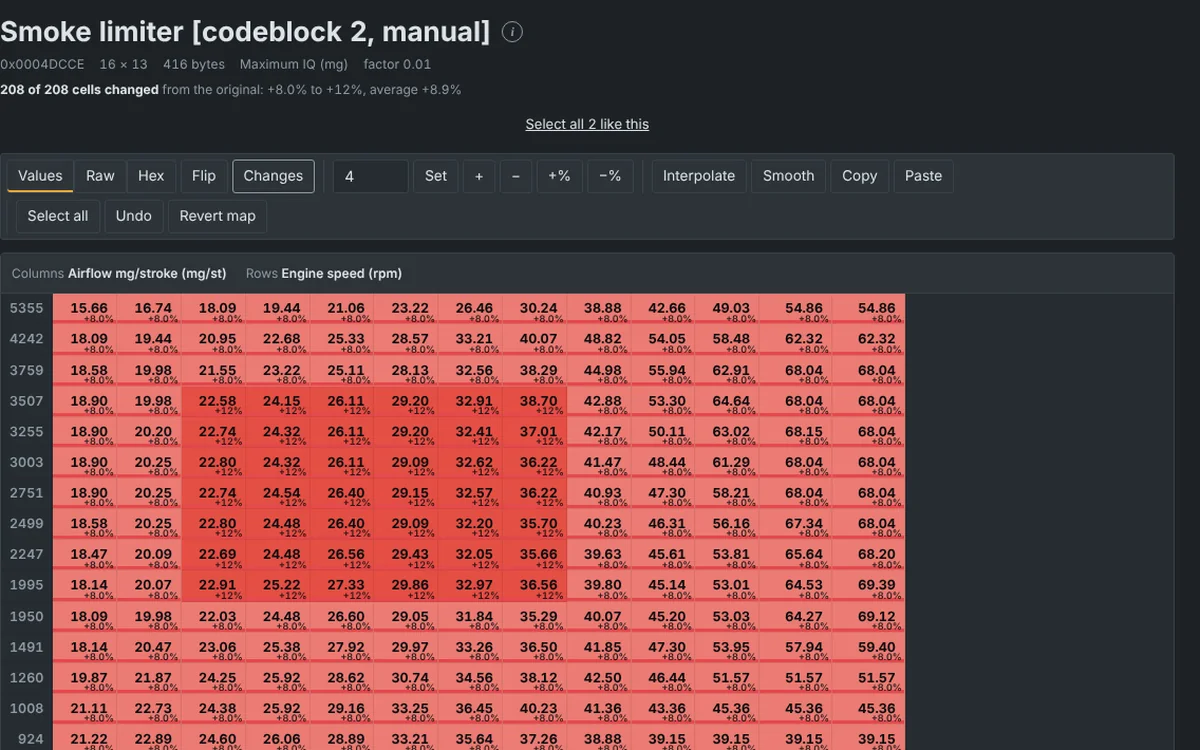
The Changes view shades each cell by how far it has moved from your original and gives the % change. Load another file, or your stock copy, and step through every map that differs.
- A mark in the list for every map you’ve touched
- Copy maps across from the other file
- Your own stock library, kept in the browser
Logs
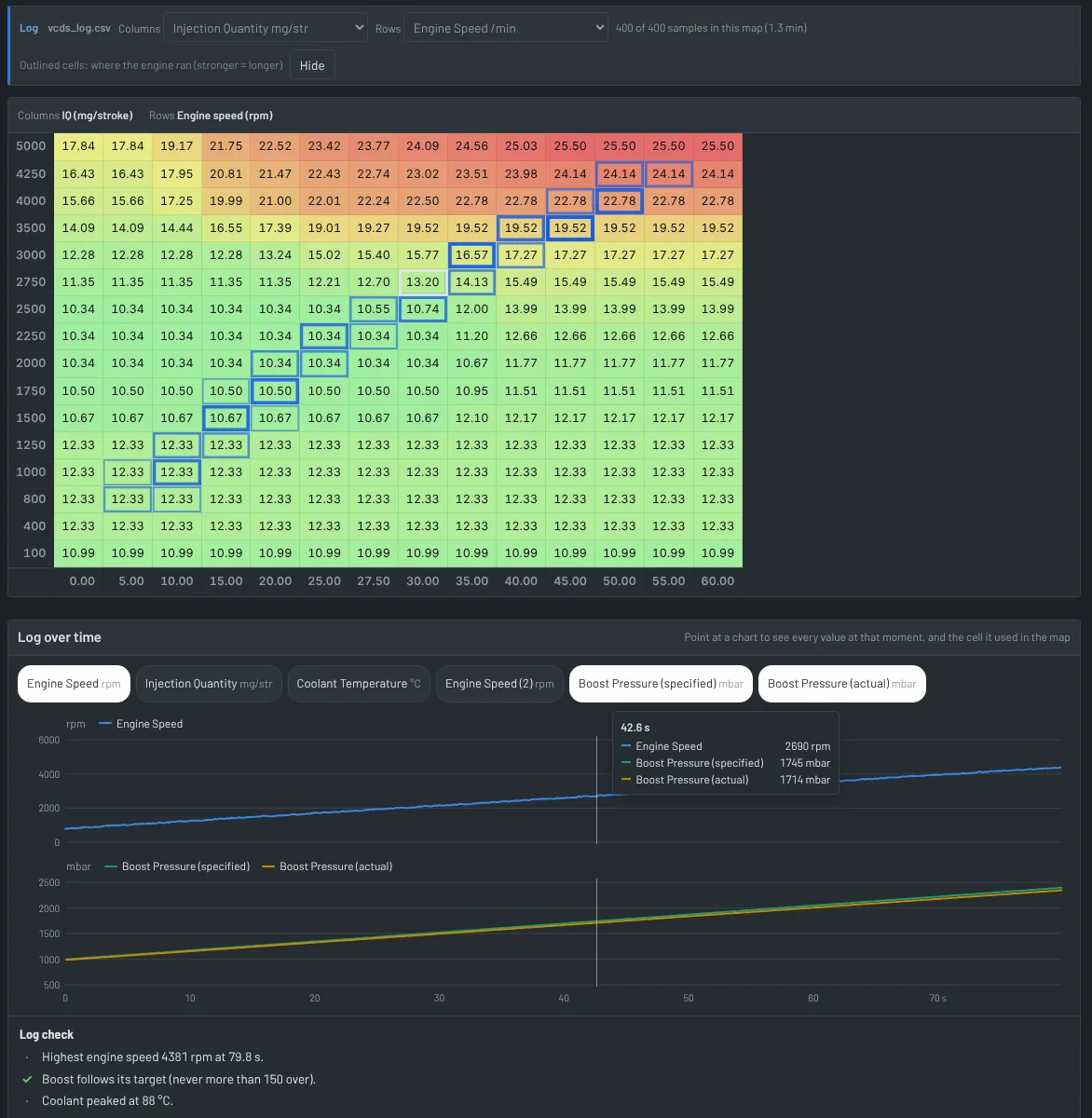
Load a VCDS log or a logger’s CSV. The map cells the engine actually ran in are outlined, darker where it stayed longer, and the log is plotted over time underneath: point at a moment and its cell lights up in the map.
- Boost specified and actual on one chart
- Log check: overshoot, undershoot, fuel shortfall, temperatures
- Samples beyond a map’s axes are counted, not hidden
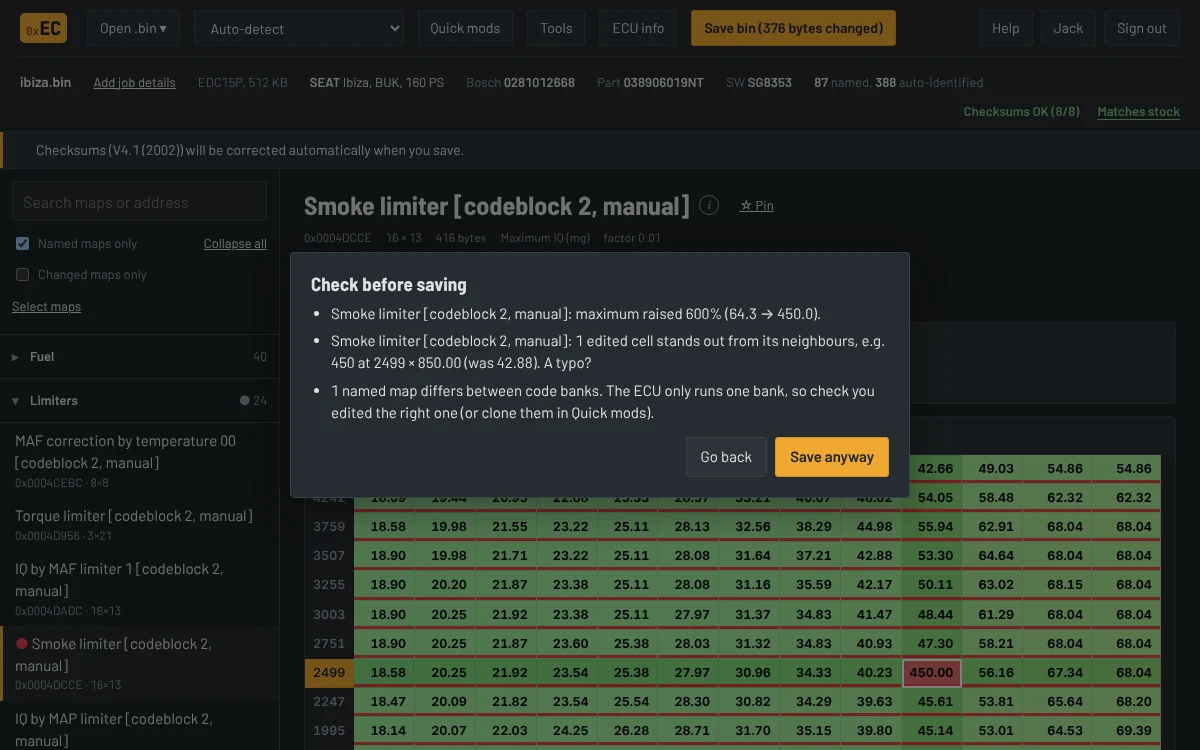
Check and save
Before the file goes, it’s checked for likely typos, big jumps, values at the limit and code banks that no longer match. Checksums are corrected on the ECUs that support it, then you save the .bin.
- Tune checklist: the maps that go together
- Fuel curve: what limits fuel at each rpm
- Files named from the reg, car and date
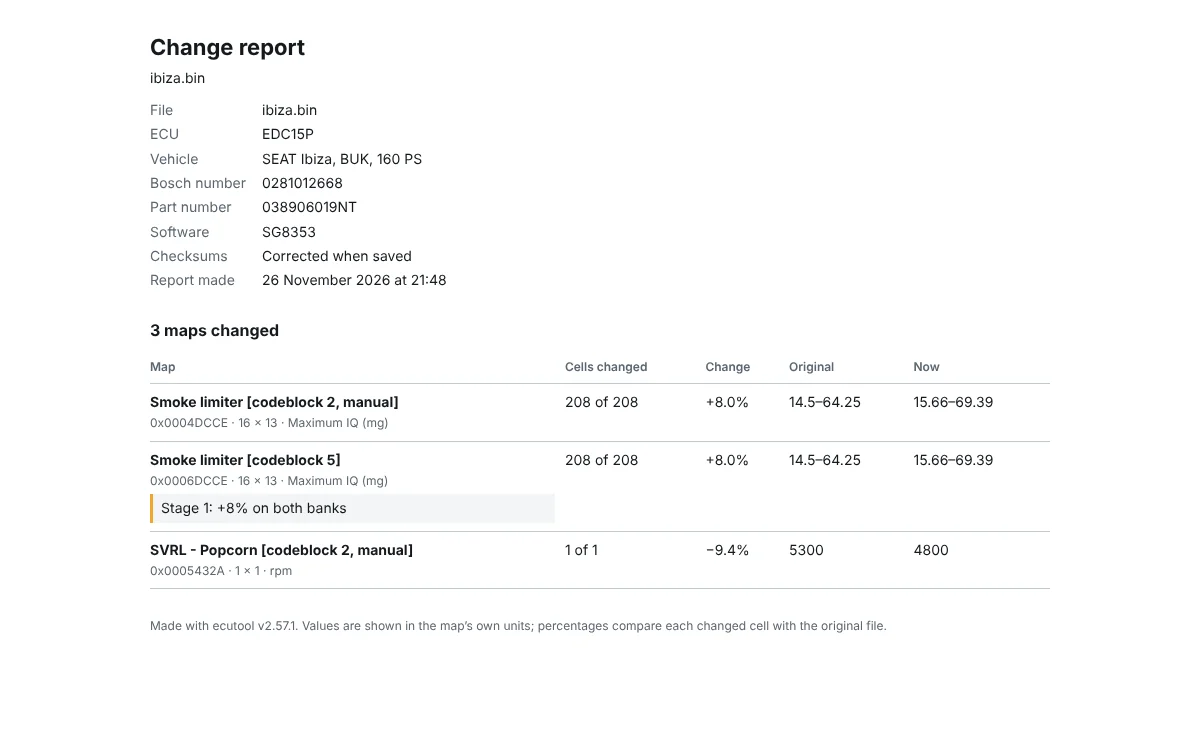
Report
Hand your customer a one-page report of every map you changed, with the original and new values and your notes. Moving the same tune onto another car with the same software takes one click.
- Opens in any browser, prints cleanly
- Transfers only maps that match the original
Also included
- Fuel and power curveFuel allowed at each rpm before and after, which map limits it, and an estimate of torque and power.
- Tune checklistThe maps that usually change together, what you’ve done to each, and what you might have missed.
- Job detailsCustomer, registration, mileage and notes with each file, on the report and in the file name.
- Import and exportName maps from a WinOLS project you own; export XDF and CSV.
- Your ECU listCar, engine code and power for each Bosch number, on every device.
- Keyboard shortcutsArrows, + and −, Enter, Ctrl+S, undo and redo: tune without reaching for the mouse.
Free to start
Free
- Open, identify and edit any file
- Every supported ECU and gearbox
- 5 free saves of modified files
Then, when you need them:
- Unlimited saves — £20 a year
- Pro Tools — £20 once: tune transfer and the DQ250 gearbox tools
Questions
Does it read or write the ECU?
No. It edits the file. Read the ECU with the tool you already use (such as MPPS, Galletto or KESS), edit the read here, and write the saved .bin back with the same tool.
Is my file uploaded?
No. The .bin is opened and edited in your browser and stays on your computer. Your account records the name, size, ECU type, part numbers and a checksum of each file you open, so you can see your file history, and, on the free plan, a fingerprint (SHA-256) of each file you save, to count free saves. A file is only sent to us if you choose to send it for support from the “Unsupported ECU Type” screen.
What do I need to run it?
Any up-to-date Chrome, Edge, Firefox or Safari, on Windows, Mac, Linux, a tablet or a phone. Nothing to install.
Which files does it open?
Full .bin and .ori reads, and two-chip LOW/HIGH pairs opened together. 7 ECU families have their maps named and 8 more are experimental; DQ250 gearbox shift maps are named and other gearbox units recognised. Anything else opens in the hex editor.
Does it correct checksums?
Yes, when you save, on the ECUs that support it; the list below says which. On the others, correct them with your flashing tool before writing.
Is there a free version?
Yes. Signing up is free: open, identify and edit any file on screen, with 5 free saves of modified files. Saving the same file again doesn’t use another.
What costs money?
Two things, both optional. Unlimited saves (£20 a year) lift the free-save limit. Pro Tools (£20 once), an add-on to the saves plan, add tune transfer and the DQ250 gearbox tools. Everything else is free.
How do I pay?
Email contact@ecutool.dev from the address you signed up with and I’ll sort it out.
My ECU isn’t on the list
It still opens in the hex editor, and the tool can search it for tables stored with their axes. From the “Unsupported ECU Type” screen you can send the file so support can be added, or report just its name.
Can I use it on more than one computer?
Yes. Sign in wherever you are; your ECU list and settings follow you. Your stock library stays in the browser you added it to.
How often it’s updated, and what changed: What’s new.
Find your ECU
Full maps found and named · Experimental works, check the maps before relying on them · Hex only recognised, opens in the hex editor. Checksums: “—” means correct them with your flashing tool.
| ECU | Makes | Support | Maps named | Checksums |
|---|---|---|---|---|
Bosch EDC15P / P+VAG 1.9 TDI PD (ASZ, ARL, BLT, BUK…); 512 KBNotes by make (1)
| FordVW Group | Full | Named | Bosch V4.1 (all variants) |
| Bosch EDC15P-6VAG 3-cylinder 1.2 TDI PD (e.g. Lupo 3L); 512 KB | VW Group | Full | Named | Bosch V4.1 |
| Bosch EDC15V / VM+VAG 1.9 TDI VP37 (AGR, AHF, ASV, ALH…) and 2.5 TDI V6 (VP44); 256 KB, 512 KB and 1 MB. Two-chip reads (LOW/HIGH, LLL/HHH or SLL/SHH files): open both together | VW Group | Full | Named | EDC15V / VM+ |
Bosch EDC15C / C2 / C3 / C5 / C7 / C11Common-rail EDC15 (Fiat, Alfa Romeo, BMW, Opel, PSA, Renault and others)Notes by make (8)
| Alfa RomeoBMWChryslerFiatPeugeotRenaultVauxhall / OpelVolvo | Full | Named | — |
Bosch EDC15MBMW M47 2.0d and Opel / Saab DTI, including two-chip SHH/SLL reads (open both together)Notes by make (3)
| BMWSaabVauxhall / Opel | Full | Named | — |
| Bosch MSA15 / MSA12VAG 1.9 TDI (1Z, AHU) and 1.7 SDI. Two-chip reads (LLL/HHH files): open both together | VW Group | Full | Named | — |
| Bosch MSA6 / MSA11 (older BMW and Opel diesels)BMW 2.5 TD (324td, 325td, 524td, 525td) and 1.7 TDS (318tds), Opel Omega 2.5 TD; 32 KB and 64 KB. Recognised from the Bosch number | BMWVauxhall / Opel | Hex only | Not yet: these use a different layout from the VAG MSA ECUs | — |
Bosch EDC16 (U1, U31, U34, C9, C31, C35, C39…)VAG, BMW, Opel, Fiat, Alfa Romeo and others; 256 KB calibration reads (e.g. EDC16C39), 512 KB, 1 MB and 2 MB. How many maps get named varies by softwareNotes by make (6)
| Alfa RomeoBMWFiatSaabVauxhall / OpelVW Group | Full | Key maps on most software (driver’s wish, torque and smoke…Key maps on most software (driver’s wish, torque and smoke limiters, SOI, injection, SVRL); how many varies by software. Where they’re left unnamed, boost target, boost limit and smoke limiter are named from their shape (≈), and on VAG 03G906016 PD files the driver’s wish is found even where it’s stored without axes | — |
Bosch EDC17 (CP14, C46, C64…)Diesel common rail (VAG and others)Notes by make (2)
| BMWVW Group | Experimental | Driver’s wish, torque limiter, boost limit, boost pressure…Driver’s wish, torque limiter, boost limit, boost pressure, rail pressure and injector duration named from their shape (≈), with axes in rpm and mg/stroke; WinOLS import names the rest | — |
Bosch ME7 / ME7.1 / ME7.5 (petrol)VAG 1.8T, 2.7T and V8, VW 3.2 V6 and others; 512 KB and 1 MBNotes by make (1)
| Alfa RomeoVW Group | Experimental | VAG 1.8T: up to about 80 maps named on open from the firmware’s…VAG 1.8T: up to about 80 maps named on open from the firmware’s own pointers (most on 225 hp software, fewer on 180 hp and other 1.8T): lambda (LAMFA, LAMFAS, KFLF), fuel (KFTVSA and more), boost (KFLDRAPP, KFDLULS, KFLDIOPU, KFLDIWL), knock control, torque limit (KFMDWMX), air mass correction (KFKHFM); ignition maps not yet. Other ME7 engines: any matches marked ≈. Pedal-to-torque (KFPED type) on TT 180/225, S3 210 and RS4; WinOLS import names the rest | ME7 multipoint |
| Bosch MED9.1 / MED9.1.5 (petrol direct injection)VAG 2.0 TFSI (Golf GTI, Audi S3, TTS) and 5.2 V10; 2 MB | VW Group | Experimental | Unnamed: axes in rpm/%, LDRXN type recognised; WinOLS import…Unnamed: axes in rpm/%, LDRXN type recognised; WinOLS import names the rest | Code area only (59 blocks); map area: use your flashing tool |
| Continental Simos18.1 / 18.10 (VAG 2.0 TFSI EA888 Gen 3, …906259…)Golf GTI / R Mk7, Audi S3 8V, Leon Cupra and others. 4 MB full reads, or the calibration alone. Part, software, calibration ID and engine read from the file | VW Group | Experimental | From a WinOLS project you import (finding maps from the program…From a WinOLS project you import (finding maps from the program is in progress) | — |
| Continental Simos PCR2.1 (VAG 1.6 / 2.0 TDI, 03L906023…)Caddy, Golf 6, Audi A3 and others; 2 MB, full or calibration-only reads. Part, software and engine code read from the file | VW Group | Experimental | From a WinOLS project you import | — |
| Bosch ME9.2 (petrol, PowerPC)BMW N62 V8 (e.g. 650i E63); 2 MB. Recognised from its Bosch petrol number | BMW | Experimental | Maps found by the MED9 search, unnamed except engine-speed…Maps found by the MED9 search, unnamed except engine-speed curves; WinOLS import names the rest | — |
| Bosch MED17 / ME17 / MEVD17, MD1 / MG1Petrol MED17 family (e.g. VAG 1.8 / 2.0 TSI, BMW MEVD17.2), identified from the file’s EPK line. 2016-on MD1 diesel and MG1 petrol are recognised the same way but not yet tested on a read | BMWVW Group | Experimental | Maps found by layout, unnamed; WinOLS import names them | — |
| VAG DQ250 6-speed wet DSG gearbox (02E 927…, Temic)Recognised from the part or software number (02E 927…, 02E 300…). 1.5 MB full reads and smaller calibration reads (e.g. pcmflash), in either byte order | VW Group | Experimental | Upshift and downshift lines (1→2 to 5→6) named from their shape…Upshift and downshift lines (1→2 to 5→6) named from their shape (≈); gear ratio and final drive viewer and editor. Torque, launch and clutch maps not yet | — |
| Other gearbox control units (TCU)VAG DSG and S tronic: DQ200, DQ381, DQ500, DL501, and the Aisin 09G automatic. Recognised from the part number and opened in hex-only mode, with the layout search available | VW Group | Hex only | Not yet | — |
| Other ECUs: Siemens/Continental SID, Simos, PPD1.x and MS, Delphi DCM, Marelli MJD/IAW, Denso, older Bosch Motronic and BMW DDEIdentified from the file where it says what it is. Open in hex-only mode, or try a layout search (“Any ECU” in the ECU family menu). If the tool can’t open your file, you can send it from that screen so support can be added | Any make | Hex only | Not yet. A layout search finds maps only where they’re stored…Not yet. A layout search finds maps only where they’re stored with their axes, which many of these ECUs don’t do | — |
Nothing matches that. Any other file still opens in the hex editor, and you can send it to us from the tool so support can be added.